Pinterest can be a useful traffic source for Amazon affiliate marketers, but managing an effective Pinterest strategy involves more than creating attractive graphics. You need to research what people are searching for, design relevant Pins, publish content consistently, and understand which campaigns are generating meaningful results.
The challenge is choosing the right tools without paying for software you may not actually need.
Some tools focus on graphic design, others help with keyword research or scheduling, while newer AI-powered platforms aim to bring several parts of the affiliate marketing process together.
In this guide, we’ll compare four options: Pin2Profit AI, Pinterest Trends, Canva, and Tailwind. Each serves a different purpose, so the best choice depends on your experience, budget, and the way you manage affiliate campaigns.
What Should Amazon Affiliates Look for in Pinterest Tools?
Before comparing individual platforms, it helps to understand the main tasks involved in Pinterest affiliate marketing.
Keyword research: You need to understand what your target audience searches for and identify relevant topics before creating content.
Pin design: Your graphics should communicate the value of a product or article quickly. A good design tool makes it easier to maintain consistent visual quality.
Scheduling: Publishing manually can become time-consuming when you’re managing multiple campaigns. Scheduling tools help organize your publishing calendar.
Analytics: Impressions and saves can indicate visibility and engagement, but clicks and qualifying Amazon purchases are more useful when evaluating affiliate performance.
Affiliate compliance: Your workflow should support accurate links, clear disclosures, and compliance with Amazon Associates and Pinterest requirements.
You don’t necessarily need a separate subscription for every task. The goal is to build a workflow that saves time without adding unnecessary costs.
Best Pinterest Tools for Amazon Affiliates Compared
1. Pin2Profit AI https– Best for AI-Assisted Affiliate Campaign Creation
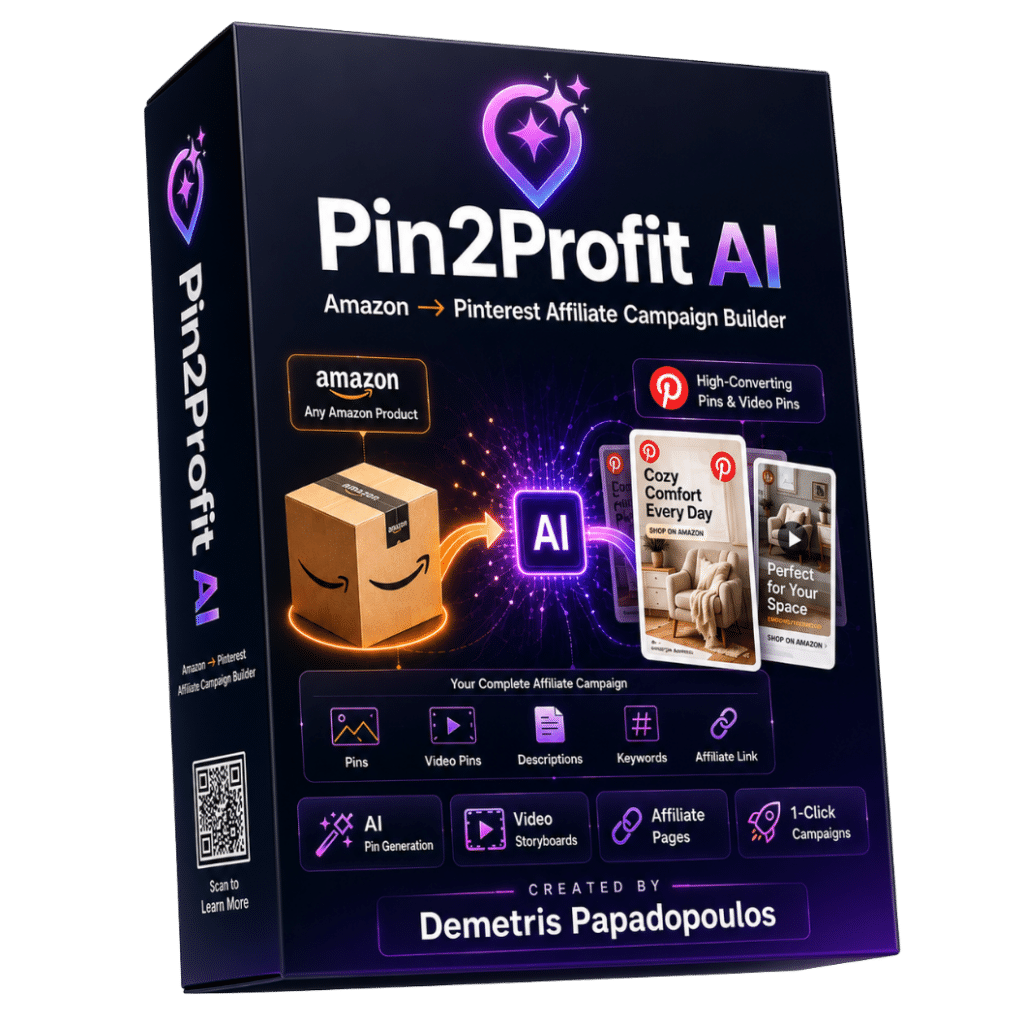
If you want a platform that focuses on the Amazon-to-Pinterest affiliate workflow, Pin2Profit AI is worth examining.
Unlike a conventional graphic design application, Pin2Profit AI is positioned as an affiliate campaign creation platform. Its stated purpose is to help users turn an Amazon product link into Pinterest promotional content through an AI-assisted process.
According to its official sales material, the platform includes several campaign-related capabilities:
- AI-generated Pinterest Pins in multiple styles.
- AI-generated video Pins.
- AI-written headlines, descriptions, calls to action, and keywords.
- Affiliate promotional page creation.
- Smart scheduling and bulk Pinterest CSV export.
- Pinterest Analytics import.
- Pinterest trend forecasting features.
- Campaign creation from a product link.
- Support for bringing your own AI API keys, with some image-generation functionality included.
The main attraction is the possibility of managing several content-production tasks in one place instead of switching between multiple applications.
For example, an Amazon affiliate promoting kitchen products could start with a product link, generate promotional content, prepare different Pin creatives, and organize the resulting campaign.
However, AI-generated content still needs human review. Product specifications, descriptions, images, and promotional claims should be checked before publication. A generated campaign is not automatically an accurate or effective campaign.
Advantages
- Designed around an affiliate campaign workflow.
- Offers multiple AI-assisted content formats.
- Can reduce repetitive content-production work.
- Includes campaign-related scheduling and analytics features according to the vendor.
Limitations
- Its feature descriptions are primarily vendor-provided, not independently tested results.
- AI-generated content may need editing and fact-checking.
- Some functionality depends on external AI services or API keys.
- Actual operating costs and the availability of particular features should be checked before purchasing.
- Automated content creation does not guarantee Pinterest reach or Amazon commissions.
Who should consider it?
Amazon affiliates who regularly create multiple promotional campaigns and want an AI-assisted workflow may find it relevant.
If you are interested in exploring the platform, you can check detail review-click here
My recommendation is to review the current feature list, pricing, included usage allowances, and refund terms before making a purchase.
Official website: https://pin2profit
2. Pinterest Trends – Best for Keyword and Trend Research

Pinterest Trends is a useful starting point for affiliates who want to understand what people are searching for before creating promotional content.
Instead of guessing which products or topics might attract attention, you can use the platform to investigate search trends, seasonal interests, and growing shopping categories.
Pinterest’s official documentation explains that Trends provides historical information covering up to two years for searches, saves, and shopping trends across different regions.
You can also select a region and compare relevant search terms. This is particularly useful when your audience includes shoppers in the United States, Canada, the United Kingdom, and Australia.
For example, someone promoting home organization products could investigate searches related to:
- Small kitchen organization
- Pantry storage ideas
- Bathroom storage solutions
- Space-saving furniture
The results can help you identify relevant content opportunities and seasonal themes.
Advantages
- Native Pinterest research tool.
- Useful for identifying seasonal opportunities.
- Supports regional trend research.
- Helps compare related search terms.
- Useful before spending money on additional keyword tools.
Limitations
- It is primarily a research tool, not a complete campaign management platform.
- Search interest does not guarantee affiliate conversions.
- Some features may vary by region or availability.
- Trend data should be interpreted alongside product relevance and buying intent.
Who should consider it?
Beginners and experienced affiliates who want to research Pinterest topics before investing time in content creation.
Official resource: https://help.pinterest.com/en/business/article/pinterest-trends
3. Canva – Best for Custom Pinterest Pin Design

A strong Pinterest campaign needs more than a product image with a few words placed over it. Your Pins should communicate a clear idea and give users a reason to visit the linked content.
Canva is one of the practical options for creating these graphics.
Its drag-and-drop editor and ready-made templates make it accessible even if you don’t have professional graphic design experience.
You can use Canva to create:
- Product recommendation Pins.
- Product comparison graphics.
- Step-by-step tutorial Pins.
- Seasonal shopping guides.
- Blog promotional graphics.
- Branded Pinterest templates.
For example, an affiliate promoting kitchen appliances could create a series of different graphics around one useful topic:
- Five Features to Check Before Buying an Air Fryer
- Air Fryer Size Guide for Small Kitchens
- Air Fryer Accessories Worth Considering
Each graphic can lead to a relevant article or resource rather than relying on repetitive product advertisements.
Canva also offers AI-assisted creative features, although availability and usage allowances depend on the current plan.
Advantages
- Beginner-friendly design interface.
- Large selection of templates and creative assets.
- Useful for maintaining a consistent visual identity.
- Supports multiple content formats.
- Free and paid plan options.
Limitations
- Designing individual Pins still requires time.
- Templates can look repetitive if they are not customized.
- Canva is not a dedicated Pinterest keyword research platform.
- Advanced features and premium assets may require a subscription.
Who should consider it?
Bloggers, content creators, and Amazon affiliates who want control over the appearance of their Pinterest graphics.
For beginners, starting with Canva’s free plan is a sensible approach. Upgrade only when you regularly need premium assets or additional functionality.
Official website: https://www.canva.com/
4. Tailwind – Best for Pinterest Scheduling and Content Management
Creating Pins consistently is one challenge. Organizing their publication is another.
Tailwind is a Pinterest marketing platform designed to support content creation, scheduling, and Pinterest-related marketing workflows.
Its current product offerings include separate Pinterest scheduling and creation, Pinterest SEO, and engagement tools, as well as a combined package.
Depending on the plan, its features include:
- Pin scheduling and publishing.
- Smart scheduling and Pin spacing.
- AI-assisted Pin creation and writing.
- Pinterest keyword research.
- Keyword tracking.
- Website content synchronization.
- Additional engagement features.
One useful consideration is that Tailwind now offers separate plans rather than requiring every user to purchase the same collection of features.
Its published pricing, as checked for this article, includes:
| Plan | Monthly billing | Annual monthly equivalent |
|---|---|---|
| Pin Scheduling & Creation | $29.99 | $17.99 |
| Pinterest SEO | $14.99 | $11.99 |
| Pinterest Engagement | $14.99 | $11.99 |
| Bundle | $44.98 | $29.98 |
Annual prices are monthly equivalents charged annually. Pricing, included credits, and features can change, so check the official pricing documentation before subscribing.
Advantages
- Helps organize Pinterest publishing.
- Offers scheduling and content-management functionality.
- Includes dedicated Pinterest SEO options.
- Separate plans allow users to choose specific capabilities.
- Useful for managing a more structured publishing workflow.
Limitations
- Paid plans may be unnecessary for someone publishing only a few Pins.
- Features and usage depend on the selected plan and credit allowance.
- Multiple Pinterest accounts can increase subscription costs.
- It does not replace the need for useful content and original creative ideas.
Who should consider it?
Affiliates who already publish regularly and want more control over their Pinterest scheduling and content-management process.
Official website: https://www.tailwindapp.com/
Pinterest Tools Comparison: Which One Does What?
The following table summarizes the main differences.
| Tool | Primary purpose | Best suited for |
|---|---|---|
| Pin2Profit AI | AI-assisted affiliate campaigns | Campaign creation |
| Pinterest Trends | Search and trend research | Keyword discovery |
| Canva | Graphic design | Pin creation |
| Tailwind | Scheduling and Pinterest management | Publishing workflow |
These tools are not direct substitutes for one another.
For example, Canva and Tailwind solve different problems. Canva helps you design a Pin, while Tailwind helps organize its publication.
Similarly, Pinterest Trends helps you research topics, whereas Pin2Profit AI is positioned around producing affiliate promotional campaigns.
The right comparison is therefore about workflow suitability, not simply counting features.
Free vs. Paid Pinterest Tools: Which Do You Actually Need?
A common mistake among new affiliates is purchasing several subscriptions before establishing a consistent publishing routine.
You can avoid this by starting with a smaller tool stack.
A Free Tool Stack for Beginners
A practical starting combination could include:
- Pinterest Trends for keyword and trend research.
- Canva Free for creating graphics.
- Pinterest Business tools for publishing and basic performance monitoring.
Pinterest also provides native scheduling for standard Pins. Its official help documentation states that users can schedule Pins up to 30 days ahead, with a maximum of ten future Pins scheduled at a time.
This can be sufficient when your publishing volume is relatively small.
When Should You Pay for Scheduling Software?
A paid scheduler becomes more relevant when manually organizing Pins starts consuming too much time.
Consider upgrading when:
- You manage multiple content categories.
- You publish regularly across several campaigns.
- You need additional scheduling flexibility.
- You want more detailed Pinterest keyword tracking.
- Your existing workflow is becoming difficult to manage.
The important point is to identify a real operational problem before paying for a solution.
When Is an AI Pin Generator Worth Considering?
AI-assisted tools can help when you need to produce multiple content variations or organize repetitive campaign tasks.
However, more generated Pins do not automatically mean better results.
Review the output carefully. Each Pin should offer a distinct, relevant reason for someone to click. Avoid publishing large quantities of nearly identical graphics or descriptions.
How to Build a Pinterest Workflow for Amazon Affiliate Marketing
Choosing the right tools is only part of the process. You also need a practical system for using them.
Step 1: Research Products and Keywords
Start with a product category that has genuine relevance to your target audience.
Use Pinterest Trends to investigate related search terms and seasonal interests.
Look beyond broad keywords. Specific searches can help you develop more useful content ideas.
For example, instead of targeting only “kitchen appliances,” investigate topics such as “small kitchen appliances for apartments” or “compact air fryer buying guide.”
Step 2: Create Useful Pinterest Graphics
Use Canva or an AI-assisted design platform to prepare relevant Pins.
Try different creative approaches:
- Product feature explanations.
- Buying guides.
- Comparison graphics.
- Problem-solving tips.
- Seasonal recommendations.
The objective is to help users understand why the linked content might be useful.
Step 3: Add Affiliate Links and Disclosures
Use valid Amazon Associates links and follow the relevant program requirements.
Amazon requires clear and conspicuous disclosure of affiliate relationships. Its US Associates guidance gives examples such as “(paid link)” and “#ad.”
The required Amazon Associate identification statement must also appear clearly on your website:
“As an Amazon Associate I earn from qualifying purchases.”
Do not assume that a disclosure on your website automatically covers every social media post. Follow the applicable Amazon marketplace and advertising requirements.
Step 4: Schedule and Publish Content
Use Pinterest’s native scheduler or a third-party service such as Tailwind.
Plan your content around relevant topics and seasonal opportunities.
Avoid repeatedly publishing identical Pins. Pinterest recommends creating original content and warns that duplicate uploads can result in spam-related restrictions.
Step 5: Track Meaningful Results
Monitor more than impressions.
Useful performance indicators include:
- Impressions: How often your Pins were displayed.
- Saves: How often users saved your content.
- Outbound clicks: How many users visited your destination.
- Click-through rate: The proportion of impressions resulting in clicks.
- Amazon clicks and qualifying purchases: Whether the traffic is generating affiliate activity.
Use Pinterest analytics and the reporting available in your Amazon Associates account to understand performance.
Do not assume that a Pin with high impressions necessarily produces sales.
Common Mistakes to Avoid When Using Pinterest Tools
Even good software cannot compensate for a weak content strategy.
1. Buying too many tools too early
Overlapping subscriptions increase costs without necessarily improving results. Start with essential features and expand only when there is a clear need.
2. Publishing repetitive AI-generated content
AI should support your creative process, not replace editorial judgment. Review every generated Pin for accuracy, relevance, and originality.
3. Ignoring affiliate disclosures
Affiliate transparency is important for both compliance and audience trust. Make your commercial relationship clear wherever required.
4. Choosing keywords without understanding intent
A popular keyword is not automatically a profitable affiliate keyword. Think about whether the person searching is looking for information, product comparisons, or buying recommendations.
5. Measuring success through impressions alone
Visibility matters, but meaningful clicks and qualifying purchases are more relevant to an affiliate business.
Which Pinterest Tool Is Best for Your Affiliate Marketing Workflow?
There is no single tool that is the right choice for every Amazon affiliate.
Here is a practical way to decide:
| Your situation | Suggested tool |
|---|---|
| You want AI-assisted campaign creation | Pin2Profit AI |
| You need Pinterest trend research | Pinterest Trends |
| You want creative control over graphics | Canva |
| You need structured Pin scheduling | Tailwind |
| You are starting with a limited budget | Pinterest Trends + Canva Free |
If you are new to Pinterest affiliate marketing, start with a simple setup. Learn how your audience responds before committing to several paid services.
If you already have a consistent publishing routine, specialized tools may help reduce repetitive work and improve organization.
Frequently Asked Questions
What is the best free Pinterest tool for Amazon affiliates?
Pinterest Trends and Canva Free are useful starting points. Pinterest Trends helps identify search and shopping trends, while Canva Free provides tools for designing Pinterest graphics.
Is Canva enough for Pinterest affiliate marketing?
Canva can be enough for designing Pins, especially for beginners. However, it does not replace keyword research, scheduling, affiliate link management, or performance analysis.
Do Amazon affiliates need Pinterest scheduling software?
No. Pinterest Business accounts have a native scheduling option for standard Pins. Third-party scheduling software becomes more useful when you need additional publishing and management features.
Can AI generate Pinterest affiliate Pins?
Yes. AI-powered platforms can assist with graphics, headlines, descriptions, and other creative elements. However, users should review the output for factual accuracy, originality, product relevance, and compliance before publishing.
Can you use Amazon affiliate links on Pinterest?
Amazon affiliate promotion through social media must follow the applicable Associates Program requirements and Pinterest policies. Check whether your specific account and traffic source meet the relevant program conditions, and disclose affiliate relationships clearly.
Are Pinterest automation tools safe to use?
A tool’s existence does not automatically mean every automated activity is permitted. Use tools that operate within Pinterest’s requirements, avoid repetitive or spam-like publishing, and review the permissions and activities of any connected application.
Final Verdict: Choosing the Right Pinterest Tools
The best Pinterest tools for Amazon affiliates are the ones that solve real problems in your content workflow.
Pin2Profit AI is worth considering if you want an AI-assisted approach to affiliate campaign creation. Pinterest Trends is a useful research resource, Canva offers accessible graphic design, and Tailwind provides additional scheduling and management capabilities.
You do not need to purchase all four.
Start by identifying the task that consumes most of your time. Choose a tool that addresses that problem, measure whether it genuinely improves your workflow, and expand your software stack only when necessary.
A sustainable Pinterest affiliate strategy is built on useful content, relevant product recommendations, consistent publishing, and honest performance analysis—not on the number of tools you subscribe to.